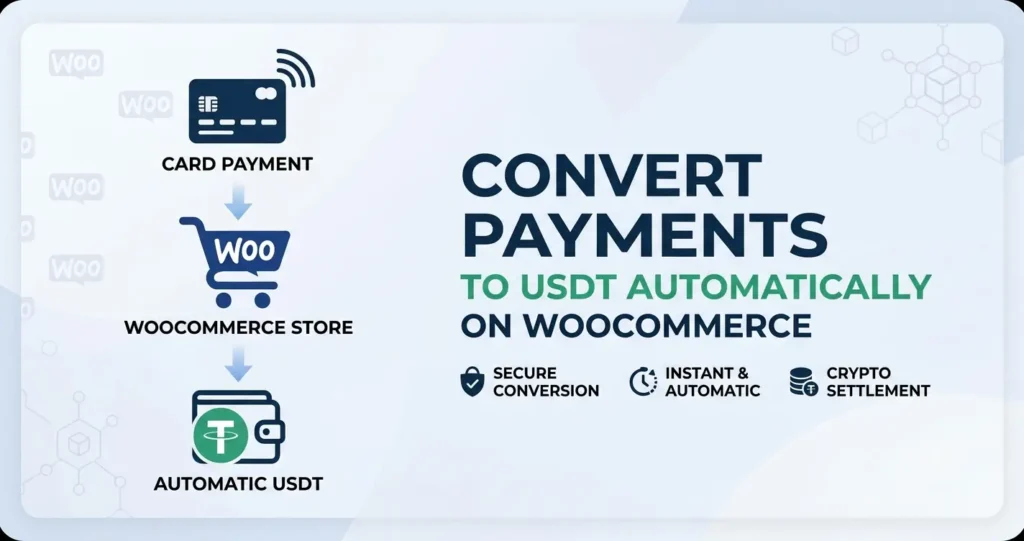
Converting card payments to USDT automatically on WooCommerce means your customers pay with any card or digital wallet, and you receive the equivalent value in Tether (USDT) directly to your crypto wallet — no bank account required. This approach to converting card payments to USDT eliminates chargebacks, removes banking restrictions, and gives high-risk merchants a stable, borderless settlement method that works from day one. Understanding how convert card payments to usdt works helps readers make smarter decisions.
- Convert card payments to USDT automatically using a card2crypto gateway plugin like WcPay on WooCommerce.
- Customers pay with credit cards, Apple Pay, Google Pay, or PayPal — you receive USDT instantly.
- The conversion is handled server-side; no manual exchange or KYC process is required from the merchant.
- USDT payouts are irreversible, which means zero chargebacks for your store.
- Setup takes under one minute: install the plugin, enter your serial key, and add your USDT wallet address.
- No LLC, no business registration, and no bank account are needed to get started.
- A card2crypto gateway is the only reliable way to accept cards and settle in USDT without a traditional merchant account.
- WcPay is purpose-built for high-risk WooCommerce stores and supports cards, Apple Pay, Google Pay, PayPal, Revolut Pay, Binance Pay, Interac, and UPI.
- USDT payouts arrive directly in your Trust Wallet or any compatible wallet — no intermediary exchange needed.
- Chargebacks are structurally impossible with crypto settlements because blockchain transactions cannot be reversed by a bank.
- You only need a WooCommerce website and a USDT wallet to start accepting payments today.
- What Does It Mean to Convert Card Payments to USDT Automatically?
- Why High-Risk Merchants Choose USDT Settlement Over Bank Payouts
- How to Convert Card Payments to USDT on WooCommerce: Step-by-Step
- Which Payment Methods Trigger Automatic USDT Payouts?
- Card2Crypto vs Traditional Merchant Accounts: Feature Comparison
- Common Mistakes to Avoid When Setting Up USDT Payouts
- Frequently Asked Questions
What Does It Mean to Convert Card Payments to USDT Automatically?
To convert card payments to USDT automatically means the payment gateway handles the fiat-to-crypto conversion on your behalf the moment a transaction is completed. Your customer never touches crypto — they pay with a Visa, Mastercard, Apple Pay, or Google Pay as usual. The gateway processes the card charge, converts the fiat value, and pushes USDT to your designated wallet address without any manual step from you. Comparing convert card payments to usdt options is the first step to finding the best value.
This is fundamentally different from asking customers to pay in crypto directly. The USDT stablecoin is pegged to the US dollar, so you receive a predictable amount — not a volatile asset — making it a practical settlement currency for everyday business operations. Many readers search for convert card payments to usdt before making their first purchase.
Why High-Risk Merchants Choose USDT Settlement Over Bank Payouts
High-risk merchants choose to convert card payments to USDT because it removes every friction point that traditional banking introduces: account freezes, rolling reserves, chargeback disputes, and arbitrary terminations. When your settlement currency lives on a blockchain, no bank can hold your funds for 180 days or close your account overnight. The right convert card payments to usdt platform saves time and reduces frustration.
There are three structural reasons USDT settlement outperforms bank payouts for restricted-industry sellers: Experienced buyers know that convert card payments to usdt quality varies by platform.
- Zero chargebacks: Blockchain transactions are irreversible. A customer cannot file a chargeback with their bank and claw back funds that have already settled as USDT in your wallet.
- No geographic restrictions: USDT travels across borders instantly. Whether you sell to customers in Europe, Asia, or the Americas, you receive the same payout without currency conversion fees or correspondent bank delays.
- No merchant account approval: Traditional processors require underwriting, documents, and ongoing compliance monitoring. A card2crypto gateway like WcPay approves you instantly because the chargeback risk that underwriters fear is eliminated at the settlement layer.
For a deeper look at why this model is gaining traction, see our guide on why smart merchants accept cards but settle in stablecoins. Finding a reliable convert card payments to usdt source is easier than most people expect.
How to Convert Card Payments to USDT on WooCommerce: Step-by-Step
Converting card payments to USDT on WooCommerce requires only a plugin, a serial key, and a USDT wallet address. The entire process takes under one minute once you have your credentials from WcPay. The best convert card payments to usdt services prioritize instant delivery and clear pricing.
What Happens Behind the Scenes on Each Transaction?
When a customer completes checkout, the WcPay gateway captures the card or wallet payment in fiat. The system then converts the net transaction amount and pushes the USDT equivalent to your wallet address, typically within minutes. You do not need to log into any exchange or manually trigger a withdrawal. Checking reviews before choosing a convert card payments to usdt provider is always recommended.
This automation is what separates a true card2crypto gateway from manually converting bank deposits into crypto yourself — a process that is slow, taxable in many jurisdictions, and subject to exchange KYC requirements.
Which Payment Methods Trigger Automatic USDT Payouts?
Every payment method natively supported by WcPay will automatically convert card payments to USDT upon successful transaction completion. This breadth of accepted methods is one of WcPay’s strongest differentiators compared to single-method crypto processors.
| Payment Method | Customer Region | Payout Currency | Chargeback Risk |
|---|---|---|---|
| Credit and Debit Cards (Visa, Mastercard) | Global | USDT | Zero (settled in crypto) |
| Apple Pay | Global (iOS/Safari) | USDT | Zero |
| Google Pay | Global (Android/Chrome) | USDT | Zero |
| PayPal | Global | USDT | Zero |
| Revolut Pay | Europe, UK | USDT | Zero |
| Binance Pay | Global (crypto users) | USDT | Zero |
| Interac | Canada | USDT | Zero |
| UPI | India | USDT | Zero |
This means a Canadian customer can pay with Interac, an Indian customer with UPI, and a European customer with Revolut Pay — and all three transactions settle into the same USDT wallet automatically. Learn more about accepting this range of methods in our article on how to accept all major payment methods on your high-risk store.
Card2Crypto vs Traditional Merchant Accounts: Feature Comparison
Understanding the difference between a card2crypto gateway and a traditional merchant account helps you make the right infrastructure decision for your store. The two models serve the same surface-level goal — accepting card payments — but diverge sharply in risk profile, approval speed, and payout mechanics.
Traditional processors like Stripe and PayPal hold funds in fiat, apply rolling reserves on high-risk accounts, and can freeze balances at any time. A card2crypto model converts card payments to USDT at settlement, removing the fiat holding layer entirely.
According to payment gateway infrastructure principles, settlement risk is the primary reason processors impose reserves and restrictions on high-risk merchants. Eliminating fiat settlement removes that risk vector structurally.
For a detailed breakdown, see our comparison of card2crypto vs traditional merchant accounts.
Common Mistakes to Avoid When Setting Up USDT Payouts
Even a straightforward setup to convert card payments to USDT can go wrong if you overlook a few critical configuration details. These are the most frequent errors merchants make during their first WcPay installation.
Using the Wrong USDT Network
USDT exists on multiple blockchain networks — TRC-20 (Tron), ERC-20 (Ethereum), and BEP-20 (BNB Chain) are the most common. Entering an ERC-20 address when the gateway is configured for TRC-20 payouts will result in funds being sent to an incompatible address. Always confirm which network your wallet supports before entering the address in the plugin settings.
Not Testing With a Small Transaction First
Before routing live customer traffic, place a small test order yourself. Confirm the USDT arrives in your wallet, check the network fee deduction, and verify the order status updates correctly in WooCommerce. This takes two minutes and prevents costly configuration errors from affecting real customers.
Skipping the Checkout Optimization Step
Converting card payments to USDT is invisible to your customers — they should never see any mention of crypto on the checkout page. Ensure your checkout labels, confirmation emails, and receipts all use standard payment language. Mentioning crypto on the customer-facing side can create confusion and reduce conversion rates.
For additional protection strategies, review our guide on how WcPay protects your business from chargebacks completely.
Frequently Asked Questions
Do customers know their payment is converted to USDT?
No. The conversion happens entirely on the merchant side after the transaction is processed. Customers see a standard card or wallet checkout experience and receive a normal payment confirmation. The fact that you convert card payments to USDT is a backend settlement detail that does not affect the customer-facing checkout flow in any way.
How long does it take to receive USDT after a sale?
USDT payouts through WcPay are described as instant, meaning the conversion and wallet transfer are initiated immediately upon order completion. Actual arrival time in your wallet depends on blockchain network congestion, but TRC-20 transactions typically confirm within a few minutes. There is no end-of-day batch settlement or multi-day holding period.
Is it legal to convert card payments to USDT as a merchant?
In most jurisdictions, receiving business revenue in USDT is legal, though tax treatment varies by country. You are not operating a crypto exchange — you are simply choosing your settlement currency. Consult a local tax professional regarding how crypto-denominated business income is reported in your specific country, as regulations differ significantly.
Can I convert card payments to USDT without a company or LLC?
Yes. WcPay does not require business registration, an LLC, or an Ltd company. All you need is a WooCommerce website and a USDT wallet. This makes it accessible to individual sellers, freelancers, and unregistered businesses that are typically rejected by traditional payment processors requiring formal corporate documentation.
What happens if a customer requests a refund?
Refunds are managed at the merchant’s discretion, just as with any payment method. Because the settlement is in USDT, you would issue a refund by sending USDT back to the customer’s wallet or by agreeing on an alternative resolution. There is no automatic chargeback mechanism — the customer cannot bypass you and file a reversal with their bank the way they can with traditional card processors.
Which USDT wallet works best with WcPay payouts?
Trust Wallet is the most commonly recommended option because it supports TRC-20 and ERC-20 USDT, is non-custodial, and is available on both iOS and Android. MetaMask is another reliable choice for ERC-20 payouts. Any wallet that supports the specific USDT network configured in your WcPay settings will work correctly for receiving automatic payouts.
Does WcPay work for merchants outside the United States?
Yes. WcPay is designed for global use and supports merchants in over 150 countries. Because settlement happens in USDT rather than through a local banking system, geographic restrictions that affect traditional processors do not apply. Merchants in Europe, Asia, Africa, the Middle East, and Latin America all use WcPay to convert card payments to USDT without geographic limitations.
Are there monthly fees for using WcPay to receive USDT payouts?
WcPay operates on a plugin purchase model rather than a monthly subscription. After purchasing from wcpay.us, you receive the plugin, a serial key, lifetime updates, and full setup support. There are no recurring monthly fees charged by WcPay itself, though standard blockchain network fees apply to each USDT transaction on the payout side.
If you are ready to convert card payments to USDT automatically and eliminate chargebacks from your WooCommerce store, the fastest path forward is to explore the complete instant USDT payout setup guide for WooCommerce and get your store processing within the next sixty seconds.